
Guardian Solutions helps Arvada businesses connect search visibility with a website that makes their services easy to understand and easy to inquire about. Whether you need ongoing SEO, better local visibility, a redesigned website or support for an existing Joomla or WordPress site, the starting point is your business goal, not a one-size-fits-all package.
Work with our Colorado Springs team through a remote consultation. Tell us what you want the website to accomplish and which services matter most to your business.
Choose the work that moves your next customer closer
- Ongoing SEO: align service pages with customer searches, resolve technical obstacles, strengthen helpful content and connect related pages. Agree the priorities and recurring deliverables before starting.
- Local visibility: make your service coverage, business information and contact options consistent and useful to people comparing Arvada providers. Location wording should explain where you serve, not pretend you have an office you do not.
- Website design and conversion: make services, benefits, relevant results and next steps easy to find on mobile and desktop. Keep the inquiry short enough to use while collecting the information needed for a useful reply.
- Joomla and WordPress support: address an existing site's usability, updates and technical needs without assuming a full rebuild is required. Maintenance and ongoing SEO are different assignments; define both when you need both.
Compare proposals by what gets delivered: the pages and technical work included, who supplies content, how revisions are handled, account ownership and the review schedule. More traffic is useful only when it attracts the right prospects. Review qualified inquiries alongside visibility and completed work, without treating a ranking promise as a business result.
Explore our SEO services and website design services. Guardian has served businesses since 2012; the Add All Electric case study provides a concrete example of our work for a Dallas–Fort Worth business, not a claim of an Arvada client result.
Accessibility is one part of a usable website, not the whole marketing plan
In its May 23, 2024 announcement, the Arvada Chamber described a website widget with adjustments for text size, contrast and animation. That is a dated example of a local organization adding presentation controls. We have not tested the Chamber’s website or assessed its accessibility, and the announcement does not establish the results of a particular customer task today.
For an Arvada business considering similar work, ask what the purchase includes beyond installing the feature. Will someone review the inquiry form, identify barriers in the underlying page, make changes and repeat the relevant tests? A tool’s settings and a provider’s assessment are separate deliverables to confirm.
W3C’s evaluation-tool guidance explains why that distinction matters: tools cannot check every aspect automatically and can produce misleading results. Use findings to investigate barriers rather than treating a scanner score as the acceptance decision.
Follow one inquiry through an error and a correction
Consider a hypothetical Arvada furniture-repair business. A visitor starts on its chair-repair page, reads the service limits and sends a question. The proposed form asks for a reply email and a short description, with an optional name. This business, its form and the observations below are invented planning examples, not a Guardian client project or tests performed on a public website.
Ask a provider to demonstrate the agreed checks in a protected test copy using invented information and an authorized test destination. The following exercise makes a small repair request concrete. It is not a complete accessibility evaluation:
- Reach the inquiry from the service page. Start at the agreed URL using the keyboard. Follow the navigation and inquiry link. Record whether the current focus is visible, whether the link can be activated and whether a menu or dialog prevents continuing or leaving. Record the browser and test conditions so the issue can be reproduced.
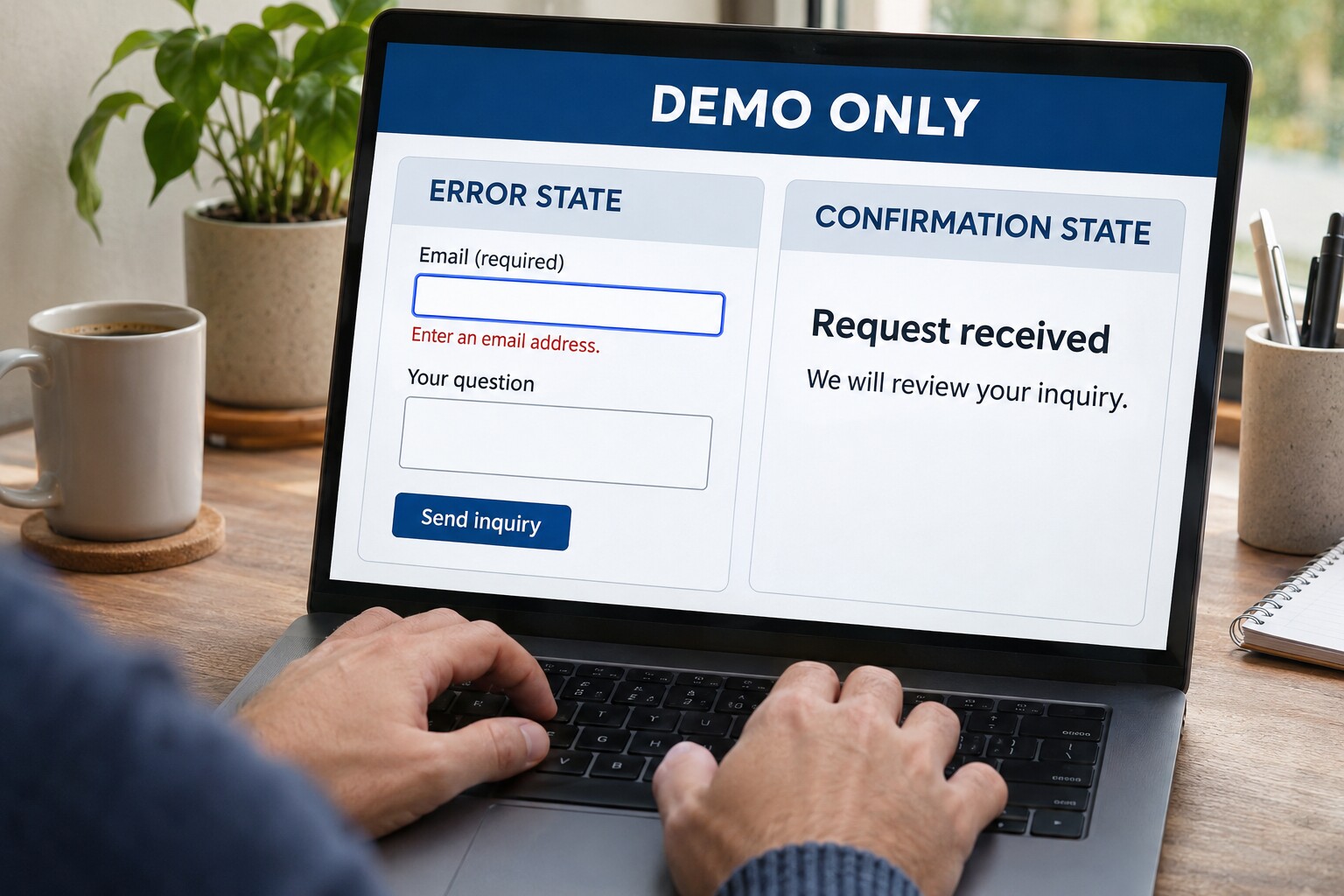
- Understand the fields before typing. The label “Email (required)” should identify the reply address being requested. A reviewer should check the label’s association with its control, not just its appearance. Ask a qualified evaluator to test the relevant assistive-technology experience. A blank box with faint placeholder text is not enough evidence that the field is understood.
- Try an incomplete submission. Leave the email empty in the test copy. The intended response is understandable text, such as “Enter an email address,” associated with the affected field. Check whether the reviewer can find the error, return to the field and correct it. Record whether useful text already entered is lost. A red outline alone leaves the reason for failure unexplained.
- Correct the error and finish. Supply the agreed test address and send the inquiry. Confirm that the completion message is available through the interaction methods in scope. In this example, the intended wording is “Request received. We will review your inquiry.” Separately verify the test record reaches the intended destination. Reading a success message and proving message delivery are different checks.
Suppose every control receives keyboard focus, but submitting without an email produces only a red border and no usable explanation. Record the error-recovery task as unresolved. Moving through controls has not demonstrated that the customer can complete the inquiry. After the correction, repeat the incomplete submission and recovery, rather than checking only the newly added wording.
W3C’s form-notification guidance supports clear error instructions and completion feedback. Its Easy Checks resource also warns that a page can pass preliminary checks and still have significant barriers. A broader professional review may need other templates, downloads, assistive technologies and complete processes. This exercise does not determine ADA compliance or WCAG conformance.
Keep evidence that identifies the remaining work
For each finding, record the page and affected task, observed barrier, person able to change it, evidence required after correction and unresolved limit. Add the date and tested version. A useful entry for the invented form would read:
- Task and barrier: recover from a missing reply email; the test shows a color change without an understandable error message.
- Change owner: the developer responsible for the form template, with the business approving the wording.
- Evidence required: repeat the same error, locate its explanation, correct the field and complete the test through the agreed keyboard and assistive-technology checks.
- Remaining limit: this record covers one form and its tested states. It says nothing yet about the downloadable care guide or an outside payment service.
Use separate statuses for a reported issue, an implemented change and a verified result. If the developer cannot edit an embedded component, name the outside supplier and the pending response. Do not close the finding merely because a request was sent. Agree the interim customer contact option, its limitations and who will review the unresolved barrier.
Price the report, repairs and retesting separately
Ask each provider to quote the same customer task and identify these five parts. They can be supplied together or by different people, but an audit price should not silently become the assumed price of all the repairs.
- Assessment and report: name the pages, processes, documents, target standard and version, evaluation methods, tested technology combinations and exclusions. Ask for findings another developer can reproduce.
- Developer remediation: identify the code, template or component changes, access needed and issues requiring more investigation. Explain whether a shared fix affects other pages.
- Content and document work: assign labels, instructions, alternatives, captions and any PDF work to the appropriate owner. Supplying new wording and repairing a document’s structure can be different assignments.
- Specialist retesting: specify who re-evaluates corrected issues, what wider checks are included and what evidence will be delivered. If independent review is required, name who can provide it.
- Training and future checks: identify the staff changes that could reintroduce barriers and the review after relevant updates. Set any ongoing frequency and charge explicitly.
W3C’s conformance-evaluation methodology overview describes scoping, representative sampling and reporting, and the expertise needed for the work. Use a qualified evaluator to settle the appropriate coverage. This five-part purchasing list is not itself an evaluation method or a conformance report.
Supplying digital work to the City of Arvada?
The City’s published general terms and conditions, section 26 on page 4, address accessibility of digital material supplied under an agreement. They also describe certification at the City’s request and a possible determination by a third party selected by the City.
If your project is subject to an applicable City agreement, provide the actual requirement before commissioning a report or promising a deliverable. Have qualified legal and accessibility advisers resolve the applicable terms, standard, evidence and acceptance process. A general design review may not satisfy that purchase. These published terms do not automatically apply to every private Arvada website, and this page does not interpret your agreement or offer a compliance guarantee.
Bring Guardian the task and any existing findings
Guardian’s website design guidance includes contrast, headings, keyboard access, descriptive links and labeled forms in the design review, with formal accessibility testing defined separately. For an existing site, our WordPress support and Joomla support discussions begin with the installed system and relevant dependencies. Those services do not establish an included specialist audit or certification.
Send the public page address, the action a customer needs to complete, any existing report and any contractual requirement. Keep passwords and private customer records out of the initial inquiry. Ask which implementation work Guardian can scope and which assessment needs a qualified specialist. The free website and SEO audit with a 30-minute consultation is a separate starting review, with no purchase obligation; it is not a formal accessibility audit. You can also browse Guardian’s Colorado service areas.
Questions about buying website accessibility work
Does installing an accessibility widget establish that customers can complete our form?
No. Installation establishes that a feature was added, not that the full inquiry works for the people using it. Ask what the feature changes and which underlying pages and form states will be evaluated. The Chamber announcement is a dated example of presentation controls, not a test report. For your site, commission the relevant review and corrections rather than treating the presence of a widget as a compliance certificate.
What can an automated accessibility scan tell us?
A scan can flag potential problems for investigation, such as some missing labels or contrast issues, depending on the tool and coverage. Ask which pages and states it examined and how uncertain findings will be reviewed. W3C says tools cannot determine every accessibility aspect automatically. A clean scan therefore does not settle whether instructions make sense, a task can be completed or the whole website conforms to a standard.
Which pages, forms and downloads should an accessibility review cover?
Give the evaluator an inventory of important customer tasks, shared templates, forms, documents and outside tools. Include steps reached after an action, such as validation errors or confirmation, rather than only the first screen. Ask the evaluator to justify the sample and document exclusions. The chair-repair inquiry is a narrow example; reviewing it does not cover every service page, care-guide PDF or payment process the business might operate.
What should a keyboard test record beyond whether Tab moves?
Record the starting page, browser, steps and expected action. Check whether focus is visible, the order is understandable, controls can be activated and a visitor can enter and leave interactive areas. Note the exact point where continuing becomes difficult or impossible. Use the record to reproduce and retest the barrier. A keyboard exercise alone does not cover other interaction methods or establish whole-site accessibility.
How should we check required fields and error recovery?
Use an agreed test copy and intentionally leave a required field empty or enter an invalid value. Check that the field is identified, the problem is explained and a correction can be made without unnecessary re-entry. Include the relevant assistive-technology checks in the evaluator’s scope. After correction, verify both the accessible completion feedback and the test submission’s destination. Do not send invented inquiries through an unapproved public form.
Is a visually clear PDF, video or image enough?
Appearance alone cannot settle whether someone can use the information. Ask the reviewer which document-structure, reading-order, text-alternative, caption or other media checks the material needs. Identify who holds the editable source and who will make the changes. If the care instructions are essential to choosing the service, discuss a usable web explanation as well. A document or media assignment should be named in the quote, not assumed covered by a homepage review.
Who fixes an inaccessible form or calendar supplied by another company?
Identify the service and the account or provider that controls its code. Your website developer may be able to change the surrounding page without being able to repair the embedded tool. Record the barrier, the supplier request, any tested alternative and what remains unresolved. A phone or email option can offer another contact route, but does not by itself prove that the embedded service meets an accessibility requirement.
How do an assessment, remediation and independent retesting differ?
An assessment identifies and documents findings within a defined scope. Remediation changes the code, content or documents. Retesting checks the revised work against the agreed requirements; independent retesting adds a separate evaluator where required or chosen. Ask for the deliverable, responsible party, charge and completion evidence for each stage. Paying for a report does not automatically pay for implementation, and a developer marking an issue fixed is not the same as a verified retest.
Do the City of Arvada’s contract terms apply to every private business website?
No. The cited general terms concern work supplied under a City agreement; their presence on the City’s website does not make them every private business’s contract. If you supply relevant digital work to the City, obtain the actual agreement and required evidence before accepting an accessibility scope. Qualified advisers should determine applicability and obligations. This answer does not establish that a private business has no other accessibility responsibilities.
What does Guardian’s design review include, and when is specialist testing needed?
Guardian’s design guidance calls for readable contrast, useful headings, keyboard access, descriptive links and labeled forms, while defining formal accessibility testing separately. Bring an existing report or precise requirement so implementation and evaluation can be priced honestly. A formal conformance assessment, contractual attestation, specialist assistive-technology testing or ongoing monitoring must be explicitly arranged with qualified people. Neither a normal design review nor the free website and SEO audit supplies those deliverables automatically.