
Colorado Springs SEO services built around qualified inquiries
Make it easier for the right customers to find your business, understand your offer and contact you. Guardian Solutions is based in Colorado Springs and helps businesses connect organic search visibility with stronger service pages, clear next steps and an ongoing improvement plan.
Build a stronger path from local search to a sales conversation
- SEO and local visibility: prioritize the services and searches that fit your customers, then address technical obstacles, internal links and useful supporting content.
- Websites that explain the value: strengthen service benefits, relevant proof, mobile usability and contact options instead of relying on traffic alone.
- Ongoing marketing direction: use agreed reporting to decide what to improve next. Separate visibility and engagement from actual inquiries wherever measurement supports it.
Explore our SEO service scope and website portfolio. For organizations serving several audiences, the local example and worksheet below show how clearer customer paths can support that broader work.
Discuss your Colorado Springs growth priorities. Tell us which services you want to sell more of and where visitors currently get stuck. We can assess whether recurring SEO, targeted website improvements or a combination is the right starting point.
A Colorado Springs organization may need one website to explain a program, invite businesses to participate and help supporters get involved. Those visitors can need different facts even when their next step is the same: ask someone on your team a question.
Before choosing page counts or form software, decide what each audience needs to know, what it can do next and who will respond. The worksheet below turns those choices into a brief your staff can approve.
Discuss your organization’s website with Guardian. Bring the audience list and the people responsible for follow-up. For general services, platforms and pricing, see our website design page.
A local portfolio example, with clear limits
Guardian’s website portfolio includes Careers in Construction Colorado as a nonprofit website example. CICC’s own Colorado Springs HBA chapter page independently establishes its regional connection.
On CICC’s public participation page, reviewed November 11, 2026, visitors can express interest in guest speaking, job shadowing, employing a student or donating. Its information-request form distinguishes those interests. That is a useful example of several purposes sharing an inquiry route.
These are two different kinds of evidence: Guardian’s portfolio identifies the work presented there; CICC’s current page shows publicly available participation choices. Neither establishes that Guardian built the present form, manages today’s workflow or produced a particular result. The planning exercise that follows is hypothetical, not a reconstruction of the CICC project.
Worked worksheet: three interests, two staff responsibilities
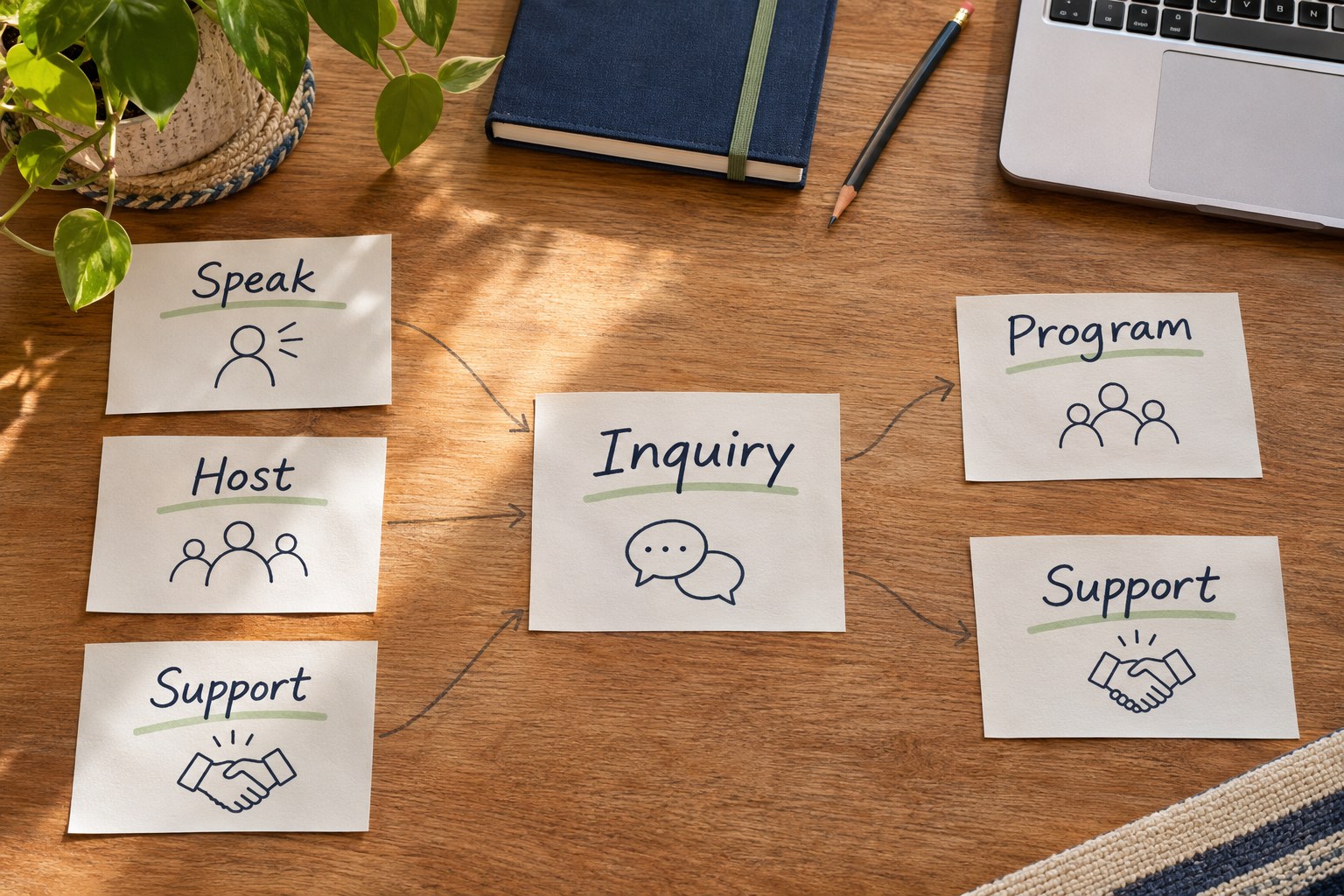
Imagine a Colorado Springs community organization running professional-skills workshops. It wants to hear from guest speakers, businesses willing to host visits and people offering financial or material support. These activities and staff roles are invented for this exercise.
Make one entry for each visitor purpose using six fields: purpose, facts to explain, next step, minimum inquiry information, responsible staff role and acceptance check. Here is a completed first draft to discuss with the organization:
-
Offer to speak at a workshop
Facts to explain: topics the organization wants covered, the expected audience and whether it is currently considering speakers. Next step: ask the program team about speaking. Minimum information: the adult contact’s name, a reply address, proposed topic and broad availability. Staff role: the program lead approves the description and assigns a responder. Acceptance check: a test inquiry retains the speaking choice and topic; the acknowledgment says staff will review the request, without confirming a speaking date.
-
Offer a business visit
Facts to explain: what a host would provide, the general location served and which arrangements still need discussion. Next step: discuss a possible visit with the program team. Minimum information: business name, adult contact and reply address, general location and a short description of the proposed visit. Staff role: the program lead checks the public explanation; a designated coordinator follows up. Acceptance check: staff can distinguish a hosting offer from a speaking offer and identify the next conversation. No participant names or confirmed visit are required at this stage.
-
Ask how to support the organization
Facts to explain: which financial or material contributions the organization currently accepts and who answers questions. Next step: discuss a contribution, rather than make a payment through this form. Minimum information: contact name, reply address, type of support and a short question or description. Staff role: the support lead approves accepted contribution types and owns the response. Acceptance check: the inquiry reaches that role, and the acknowledgment describes a request received rather than a donation completed.
These proposed fields are a starting point, not a universal form specification. Ask staff which details are necessary to give the first useful reply. Collecting everything they might need later makes the initial inquiry harder without settling who will handle it.
Choose a shared route without hiding the handoff
For this hypothetical organization, all three visitors initially want a discussion. Separate explanations can therefore lead to one categorized inquiry form. The program team handles speaking and hosting; the support team handles contribution questions. If the chosen software can route by category, include that behavior in the quote. If staff will sort requests manually, name the person who does it and how they pass each request on.
A generic contact box is simpler to maintain but leaves staff to interpret every message. Separate forms can make the purpose and required fields clearer, while creating more destinations, notifications and content to maintain. A shared form with useful categories sits between those choices. Compare it against your actual staffing and questions; no structure is automatically the best one.
Try an inquiry from a business that wants both to host a visit and offer supplies. In this example, the program coordinator owns the first reply and asks the support lead to address the supplies. The brief must say whether visitors can select multiple interests and how both reach the coordinator. Avoid making the visitor submit the same introduction twice or leaving two teams to assume the other will answer.
If the organization later wants people to donate immediately, that is a different action. Identify an appropriate payment destination and scope its setup, provider responsibilities and testing separately. A support inquiry alone does not process a donation. Likewise, receiving a speaking or hosting inquiry does not accept someone into an activity.
Approve the explanation and the responsibility together
Before the design quote is finalized, replace the worksheet’s role labels with the people your organization has chosen. The factual approver confirms what you offer; the responder accepts responsibility for the inquiry. One person can hold both roles, but do not leave either implicit.
Give those people the proposed explanation, form choices and acknowledgment wording together. For each route, ask: is the information accurate, can a visitor choose the right option, and can staff tell who owes the reply? Use invented details for the review. Do not attach participant records to demonstrate a website-planning problem.
Record unanswered questions in the brief. If nobody can yet approve a host offer, settle that before presenting hosting as available. If the team cannot assign a responder, a more elaborate form will not resolve the gap. Agree who maintains these choices when activities or staff change.
Bring the audience decisions into your Guardian proposal
Share your current website, the completed audience entries, public program materials and the names or roles of your approvers and responders. Identify any existing form or donation service and explain which action it performs. There is no need to provide passwords or private participant information in the initial request.
A Guardian website design proposal defines copy, pages, forms, integrations, review rounds and launch checks. Ask it to distinguish the audience explanations from any routing setup, outside service or continuing update work. Hosting, support and ongoing SEO have their own agreed scope.
Arrange a website-planning conversation to discuss those decisions. Guardian is based in Colorado Springs. Local meetings are by arrangement, and remote conversations are available; the published mailing address is not a walk-in meeting location.
Questions about websites with several audiences
Does an organization with several audiences need several websites?
Start with the decisions visitors need to make. Speakers, host businesses and supporters can share one site while reading different explanations. Separate websites add publishing, navigation and upkeep responsibilities. Consider them only when the programs genuinely need separate management or identities. For the example above, one website with clear participation choices is a reasonable starting brief; the audience count alone does not justify additional sites.
When is one categorized inquiry form enough?
It can be enough when each visitor is asking for a conversation and the team can route the request using a short set of choices. Include an option for uncertainty and decide how multiple selections are handled. In the hypothetical worksheet, speaking, hosting and support inquiries can share a contact route. Verify that the selected purpose reaches staff with the message rather than appearing only on the visitor’s screen.
When should an audience have its own destination?
Use a distinct destination when the action or required information materially changes. Reading about support and asking a donation question can lead to an inquiry form. Completing a payment needs an appropriate payment destination and separately agreed setup and testing. A longer explanation may deserve its own page without needing a separate form. Decide the information page and the action destination separately.
Who should approve the facts on each audience page?
Choose someone with authority over that activity. A program lead might approve what speakers or hosts are asked to do; a support lead might approve the ways the organization accepts help. Give each reviewer the audience explanation, form choices and acknowledgment wording together. A designer can organize those facts but should not decide your participation rules. Record unresolved questions before approving the design scope.
How do we confirm that an inquiry reached the right staff member?
Agree a test using invented details and a clearly marked test message. Check the selected interests, staff destination and person responsible for the reply. If two teams are involved, have one named coordinator acknowledge ownership and arrange the internal handoff. A successful form screen or an email delivered to a shared inbox does not establish that someone has accepted the follow-up responsibility.
Does submitting a participation or donation inquiry complete the action?
No. An inquiry asks the organization to respond. It does not establish that a speaker has been accepted, a visit has been approved or money has been received. Make the page, button and acknowledgment describe the stage actually reached. If you offer a separate way to complete a donation, have the responsible provider confirm that process and its receipt behavior before calling a payment complete.
What can Guardian’s CICC portfolio example tell us?
The portfolio identifies Careers in Construction Colorado as a Guardian nonprofit website example. It is useful for discussing presentation and audience needs. It does not establish who built every feature on CICC’s current site, who maintains it today or what results a similar project will achieve. Bring the part you find useful to the conversation, then ask for your own functions and responsibilities to be specified in the proposal.
What materials can we bring without sharing private participant records?
Bring public program descriptions, your website address, cleared photographs and a short list of common questions. Replace real inquiries with invented examples that preserve the routing problem. For the initial brief, do not send participant lists, student records, payment details or account passwords. If later work needs protected information or account access, establish its purpose and an appropriate process separately.
What should change when a staff member leaves or an activity pauses?
Review the public explanation, form options, destination and acknowledgment as one change. Choose a replacement responder before removing the old one. If hosting is paused, avoid leaving a form choice that suggests it is available now; explain any genuine alternative, such as asking about a future opportunity. Retest the revised route and record who approved it. Discuss ongoing updates separately from the initial website build.
How do we scope this with Guardian and arrange a Colorado Springs conversation?
Send your site address, the audiences you serve, one sample inquiry for each and the people who can approve facts and answer requests. Note any existing forms or donation service without sending login details. Guardian can discuss pages, copy, forms and testing in a design proposal. Local meetings must be arranged with the team; the published address is a mailing address, not an invitation to walk in. Remote conversations are also available.